
Windows 11 KB5037853 optional update is now available with many new features, including drag and drop support in the File Explorer address bar. This update can be downloaded from Settings > Windows Update. In addition, Microsoft has posted direct download links for KB5037853 offline installers (.msu) on the Update Catalog.
KB5037853 is an optional update, and it won’t download on your device unless you manually select “Download and install” on Windows Update. In our tests, Windows Latest observed that Windows 11’s May 2024 optional update is a big release, with a new page to manage linked devices, Microsoft account ads in the Start menu, and more.
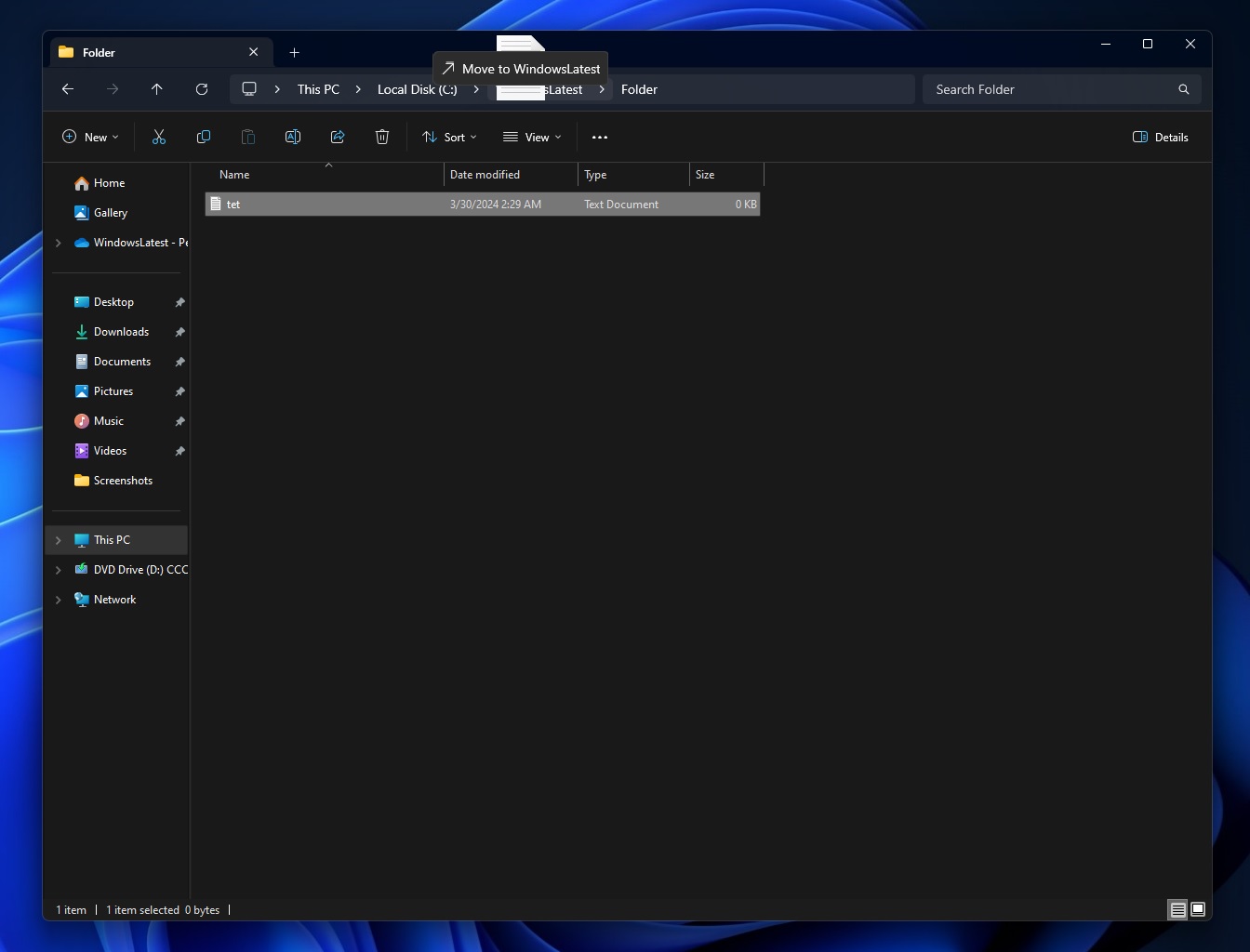
This optional update is an important release for those who missed ‘drag and drop’ support in File Explorer’s address bar. Microsoft previously told Windows Latest that the drag-and-drop feature in File Explorer was removed in Windows 11 version 23H2 because there wasn’t enough time to enable it in the new design.
Drag and drop in File Explorer after today’s optional update | Image Courtesy: WindowsLatest.com
Microsoft shipped a new design for File Explorer in 2023, but the new design did not support the drag-and-drop capability in the address bar. Back then, Microsoft told me the feature would be added back in a future release, and the company is finally delivering on its promise.
If you download and install Windows 11 Build 22631.3672 or newer, you can drag a file to another folder using the address bar. It’s a pretty basic addition, but many users couldn’t live without it.
Download Links for Windows 11 KB5037853
Windows 11 KB5037853 Direct Download Links: 64-bit | 23H2, 22H2.
Microsoft clarified in a Windows Update banner that Windows 11 Build 22631.3672 is an optional update, and you’ll need to click “Download & install” to get it. Is it safe to download the optional patch on a production device? In my experience, optional updates are largely safe and close to Patch Tuesday quality, but there could be rough edges.
On Windows Update, this patch shows up as:
2024-05 Cumulative Update Preview for Windows 11 Version 23H2 for x64-based Systems (KB5037853)
If you skip the patch, you’ll get these new features in June 2024 Patch Tuesday, which is set to begin rolling out on June 11, 2024.
What’s new in Windows 11 Build 22631.3672
In addition to drag and drop support in the address bar, Microsoft has also fixed an issue where File Explorer could take up to two minutes to launch when you pin a folder to Quick Access, and it’s also being shared on a network.
Many users flagged This critical performance issue after upgrading to Windows 11 23H2 or 22H2 from 22H2, and it’s finally getting fixed.
The File Explorer slow performance bug did not affect those who clean installed the OS using Windows 11 ISO files.
Linked Devices settings in Windows 11 Build 22631.3672 | Image Courtesy: WindowsLatest.com
After the update, you can directly manage all devices linked to your Microsoft account. As shown in the above screenshot, Windows Latest observed that the “Linked devices” page in Settings lets you manage PCs and Xbox consoles.
It also lets you view related details, such as BitLocker information, warranty and repair, a link to locate the device and get support from Microsoft.
Start menu with Microsoft account manager | Image Courtesy: WindowsLatest.com
Another notable change is the new account manager in the Start menu.
In Windows 11 KB5037853 or newer, the Start menu will feature a new account manager that will encourage you to use a Microsoft account if you’re using a local account.
If you’re signed into a Microsoft account, it will highlight the benefits of Microsoft 365, the available storage in OneDrive, and a reminder to back up your files and account by adding a phone number.
This month’s optional update is huge, so there are several other noteworthy improvements. In our tests, we observed that it’s now possible to generate a QR code for URL and OneDrive files by opening the Share menu and clicking the new “QR code” option. Note that it works only when you use Microsoft Edge.
Create QR code in Windows Share UI | Image Courtesy: WindowsLatest.com
Here’s a full list of new features and improvements in Windows 11 KB5037853:
Microsoft has rolled out a change that prevents you from closing the Share UI” when you accidentally click outside the interface.
You can now open the new Share UI to email yourself. To use the feature, open the Share UI, and click “Add email address” under “Email to myself”.
Windows Backup app now lets you link your Microsoft account, and also performs back of your sound settings. This works only when “Remember my preferences” is toggled on in Personalization.
The post Windows 11 KB5037853 out with File Explorer features (direct download .msu) appeared first on Windows Latest
Windows 11 KB5037853 optional update is now available with many new features, including drag and drop support in the File Explorer address bar. This update can be downloaded from Settings > Windows Update. In addition, Microsoft has posted direct download links for KB5037853 offline installers (.msu) on the Update Catalog. KB5037853 is an optional update,
The post Windows 11 KB5037853 out with File Explorer features (direct download .msu) appeared first on Windows Latest Read More Windows Latest