
[[{“value”:”
I’ll be honest: when I first opened Attio, I wasn’t expecting much.
There are a lot of CRMs out there claiming to be the next big thing, and most of them aren’t. But Attio’s clean interface, flexible data model, and AI-first approach made it clear pretty quickly that this team is building something different. It’s not perfect, and there are areas still being refined, but the ambition here is hard to ignore.
Attio CRM: Plans and pricing
Attio offers four tiers. You should examine the structure closely before you commit. The Free plan is a good starting point for solo users or very small teams. It supports up to three seats, includes real-time contact syncing, automatic data enrichment, and basic reporting with up to three reports. It actually works for light individual use, which isn’t always the case with free tiers. However, the object limit of three and a cap of 50,000 records will push most growing teams to upgrade quickly.
The Plus plan costs $36 per user per month, or $29 per user per month when billed annually—a 20% discount that makes the annual commitment worth considering. Plus removes the seat ceiling, unlocks private lists, enhances email sending to 1,000 per month, and bumps record storage to 250,000. It’s the entry point for small collaborative teams.
The Pro plan is where Attio starts to flex its full capabilities. At $86 per user per month (or $69 annually), it unlocks Call Intelligence, personalized outreach sequences, advanced permissions, priority support, up to 12 objects, and 1,000,000 records. For growing teams that rely on sales engagement features, Pro is likely the practical minimum. At $69 a month billed annually, it’s a big jump, but if you’re actually closing deals using their Call Intelligence, it’ll pay for itself pretty quickly.
Enterprise pricing is custom, billed annually, and targets organizations that need unlimited objects, unlimited teams, and advanced security controls, including single sign-on. The pricing transparency is a breath of fresh air, specifically the credit system, which governs AI usage. It’s clearly laid out by tier, ranging from 100 seat credits per user per month on Free to 2,500 on Enterprise. It’s a relief to see exactly what you’re paying for without digging through a 50-page PDF. That said, keep an eye on those Workspace credits. A few complex multi-step automations running in the background can eat through your monthly allotment faster than you’d expect, potentially leaving your workflows stalled halfway through the month.
Attio CRM: Features
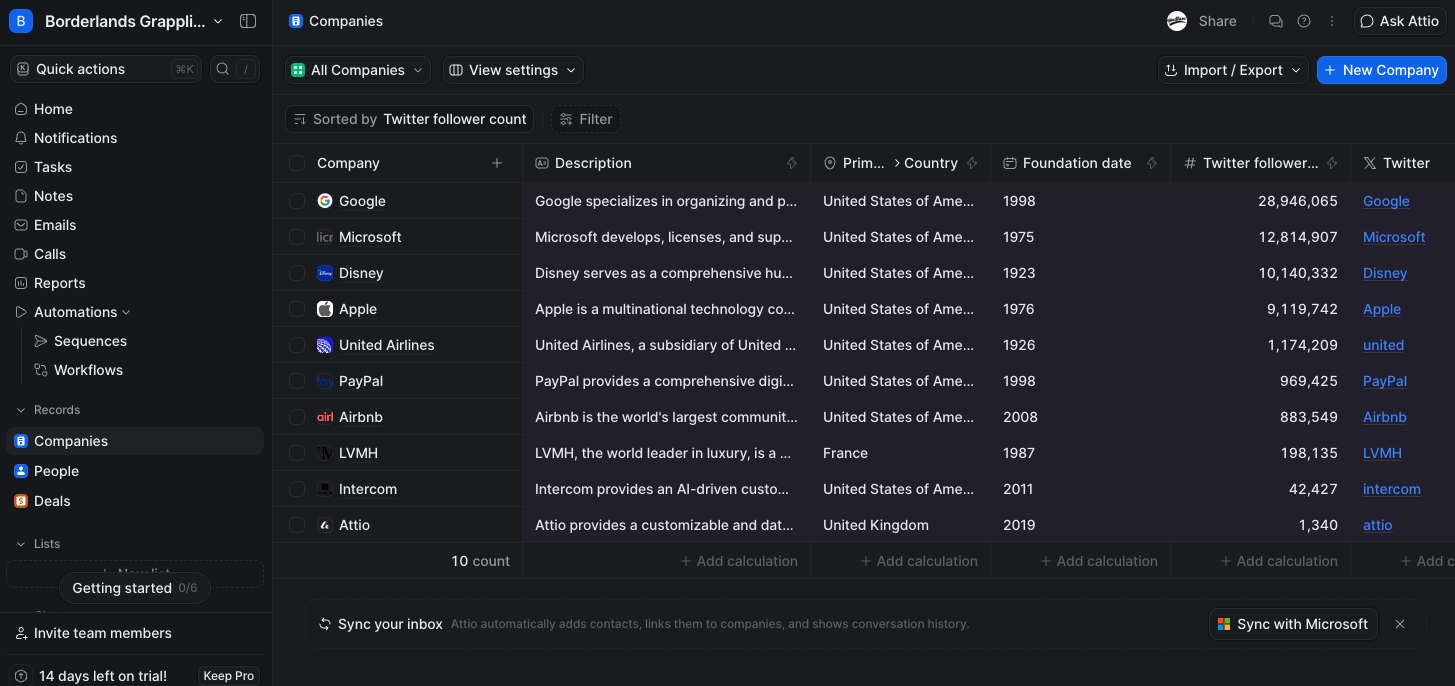
Attio is built around the idea that a CRM should work the way your business works, not the other way around. The platform pulls that off through a combination of a flexible data model, AI integration, and automation tools that can handle genuinely complex processes.
One of the first things I noticed about Attio was how differently it handles data. Instead of forcing users into strict frameworks, Attio offers the flexibility to create custom objects, like Workspaces, Partnerships, or Invoices, each with unique attributes, relationships, and views. Unlike competitors, Attio is a great fit for startups and scaling SaaS teams with non-standard sales processes, making it more adaptable than traditional CRMs.
Unlike many CRMs that slap an AI badge on an existing feature, Attio’s AI feels like it was built into the platform from day one. You can ask natural-language questions such as “prep for next meeting” or “recap last call,” and the AI pulls the relevant context straight from your CRM data. AI agents can automate tasks such as lead scoring and prospecting, going beyond the basic chatbot capabilities seen elsewhere. The MCP server for connecting to other AI tools is a nice bonus for technical teams, and it’s the kind of feature you simply won’t find in most competing CRMs.
Attio’s workflow automation engine supports complex branching logic, custom trigger conditions, and pre-built integration blocks with applications like Slack, Segment, and Zapier. Sequences, included with Pro and above, let you run personalized, multi-step outreach directly from within the platform, which goes a long way toward eliminating the need for stand-alone sales engagement software. Call Intelligence, also unique to Attio’s Pro tier, captures and analyzes meetings without requiring integration with other vendors like Gong. One thing to watch out for is the integration library. It’s got the basics covered, but if your stack includes niche tools or you’re hoping for a LinkedIn inbox sync, you’re still going to be doing some manual lifting or paying for an iPaaS middleman.
Reporting is another area where Attio has clearly put in the work. At higher tiers, you get real-time dashboards, funnel reports, segment breakdowns, historical attribute tracking, and time comparisons, all wrapped in an interface that’s clean enough that I was able to build detailed pipeline views without needing a data analyst to hold my hand.
Attio CRM: Getting set up
Setting this up was surprisingly painless. Connecting your email and calendar takes minutes, and the platform instantly begins building your contact database from your existing communication history, automatically populating records with enriched company and people data. For teams migrating from another CRM, Attio supports direct imports from Salesforce, HubSpot, Pipedrive, Zoho, and standard CSV or Excel files. A migration service is available on paid plans (contact sales for details), which is useful for larger data sets.
The onboarding experience is guided without being patronizing. Attio’s help center and a dedicated Academy cover core features, making self-serve setup realistic for non-technical founders and operators. I didn’t face the weeks-long implementation timelines that slow down enterprise CRM migrations. For most small- to mid-sized teams, Attio is functional within a day.
Attio CRM: Ease of use
It’s rare to find a CRM that doesn’t look like a 1990s tax form. With Attio, navigation is logical, and record views are uncluttered. Keyboard shortcuts and command palettes are sprinkled throughout, which power users will appreciate. The mobile apps for iOS and Android effectively mirror core functionality, including access to records, activity feeds, and calendar events, which is important for sales teams who need CRM access in the field.
That flexibility does come at a cost, though. The custom object model is powerful but requires upfront thinking about how you want to structure your data. The first hour in Attio is a bit like staring at a blank Notion page. It’s powerful, but if you don’t have a clear idea of your “objects” beforehand, you’ll spend more time playing architect than actually selling.
Additionally, the credit system for AI features, while transparent, creates a layer of resource management that simpler CRMs don’t require. You get out what you put in—don’t expect it to work magic on day one.
Attio CRM: Support
Attio provides chat and email support on all paid plans. Priority support starts at the Pro tier. The help center is thorough and well-organized, covering automation setup and developer documentation. An Experts marketplace connects users with certified Attio consultants. This is a nice addition for organizations without dedicated RevOps resources.
From what I’ve seen in user reviews, the support team knows its stuff and responds quickly. The one thing worth flagging is the lack of phone support, which could be a sticking point for larger teams used to having a dedicated account manager on speed dial.
Attio CRM: Security and privacy
In the CRM world, security usually means a boring list of compliance badges, and Attio has the big ones: ISO 27001, GDPR, and CCPA. But what’s more interesting is how they handle the “human” side of data privacy.
Since Attio effectively “lives” inside your inbox and calendar, the potential for accidentally sharing a private thread or a sensitive medical appointment is real. I was glad to see they’ve built specific guardrails for this. The “Protected Recipients” and “Blocklist” features are essential here—they let you hard-code certain domains or people (like your lawyer or a sensitive M&A lead) so that their emails never even touch the CRM.
The platform also handles email visibility with more nuance than most. By default, it usually only shows subject lines and participants, requiring a “request access” handshake if a teammate wants to read the actual body of the email. It’s a smart way to balance transparency with privacy.
Attio CRM: The competition
So, where does this fit in the crowded CRM landscape?
HubSpot is the name most people reach for first, and for good reason. Its free tier is generous and the broader ecosystem of marketing, sales, and service tools is hard to beat. The catch is that costs climb fast once you start growing.
Salesforce is the other obvious comparison, and it’s still the go-to for large enterprises that need extensive customization, but for most startups, it’s overkill.
Pipedrive is a solid, no-frills option for teams that just need a clean pipeline without all the complexity.
Attio CRM: Final verdict
Attio has pulled off something genuinely difficult: building a CRM that feels modern without sacrificing depth. The flexible data model, AI that’s integrated into the platform rather than bolted on as a marketing feature, and an onboarding experience that doesn’t require a dedicated implementation team all point to a company that actually understands what scaling teams need in 2026.
If you’ve ever felt trapped inside HubSpot’s restrictive pricing tiers or intimidated by Salesforce’s sprawl, Attio is the platform that makes you wonder why CRMs ever had to be this complicated.
That said, it’s not a tool you can hand to a new sales hire on Monday and expect results by Friday. The blank-slate setup rewards teams that come in with a clear sense of their own data structure, and the AI credit system offers a layer of resource management that simpler platforms don’t require.
The missing LinkedIn inbox sync and the absence of phone support are real gaps for enterprise buyers. But for a startup or a scaling SaaS team that’s willing to invest a day in setup, Attio delivers a CRM that bends to fit your business rather than the other way around — and that alone puts it ahead of most of the field.
“}]]
 A modern alternative to bloated CRMs Read More Latest from TechRadar US in Reviews