
[[{“value”:”
The belief that Macs are immune to viruses is no longer credible. AI-assisted phishing, cross-platform malware, and increasingly sophisticated adware have changed the landscape, and even Apple’s robust protections can’t block every threat. That’s where Intego steps in: with Mac Internet Security X9, the company stakes a clear claim for dedicated, Mac-native security as an important layer on top of what macOS already offers.
What sets Intego apart from most competitors is its deliberate focus. Unlike firms that build a cross-platform suite and later port it to macOS, Intego has designed its product around the Mac from the start. That philosophy appears in its two core security tools. VirusBarrier X9 handles real-time malware scanning for threats on both macOS and Windows. NetBarrier X9 is a two-way firewall that manages both incoming and outgoing connections. The higher-tier bundle adds a VPN that uses the Lightway protocol. Together, these features create what Intego positions as a privacy-first security stack.
The approach is coherent, but not unchallenged. Norton 360 for Mac, Bitdefender Antivirus for Mac, Surfshark One, and a revamped MacKeeper all compete for the same dollar. Each brings its own trade-offs in pricing, interface design, and feature depth. Whether Intego’s Mac-native focus justifies its premium position is the key question this review intends to answer.
Plans and pricing
Intego’s complete suite of Internet security, cleanup and organization, backup, and parental control utilities for Mac (packaged as the Intego Mac Premium Bundle X9) starts at $69.99/year for one Mac and is covered by the aforementioned 30-day money-back guarantee.
If you need coverage for more Macs, then the pricing scales accordingly, with an additional discount per-Mac. All in all, the price is quite high, but you do end up getting a good bundle of services.
If you want to add the optional VPN, you would be better off opting for the Intego ONE Complete plan, which starts at $89.99 (depending on the number of Macs requiring coverage).
If you’re looking for a cheaper option with Intego, you can opt for the Mac Internet Security X9 plan. This plan “only” offers VirusBarrier and NetBarriers but costs $39.99 for one Mac. Additional options are three Macs at $54.99 and five at $69.99.
VirusBarrier
VirusBarrier performs well, managing to keep the definitions up to date easily. In addition, it offers easy whitelist creation for files that you want excluded from the scans, which will speed up the scanning process. Real-time scanning pops up each time you connect an external drive, managing to scan even compressed files.
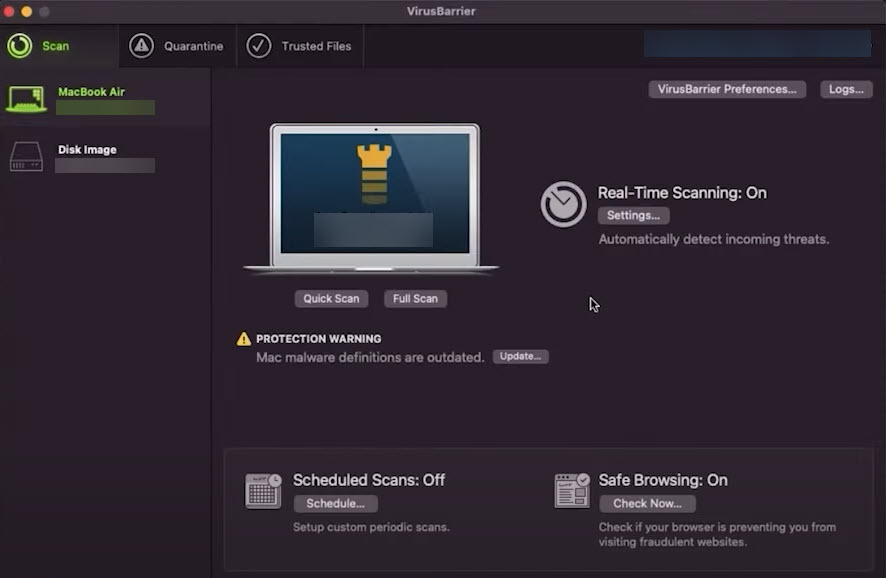
The interface is one of the most Mac-friendly we’ve seen, offering a clean and intuitive experience that makes managing security settings effortless. With flexible scanning options, users can run on-demand quick or full scans, schedule automated scans, and enable real-time protection without any impact on system performance.
Batch testing performed well on our test, removing all of the infected files we introduced to the system. For us, the fact that it removed files from compressed infected dummy files we presented was a positive surprise.
NetBarrier
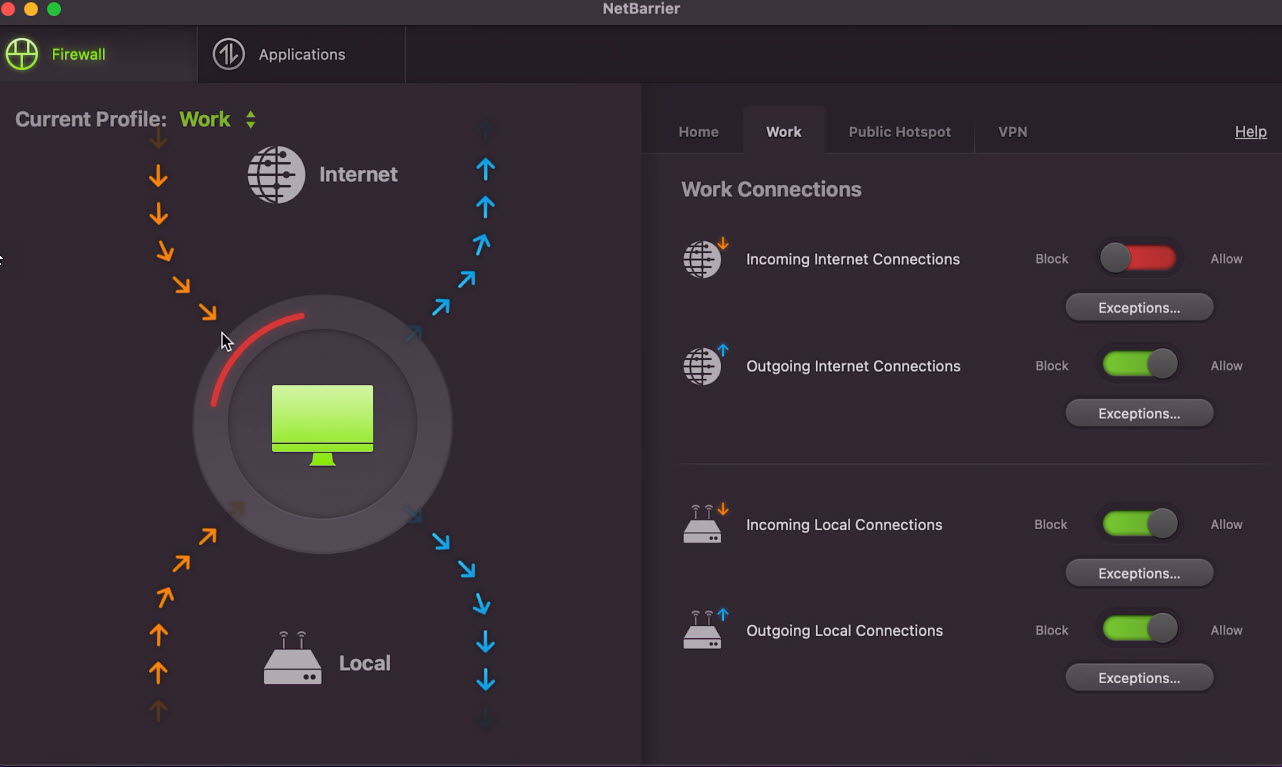
NetBarrier is effectively a two-way firewall that can protect both incoming and outgoing traffic across your network(s). Setting customizations is quite intuitive and easy to perform, allowing for simple traffic and app monitoring. Like most firewalls, the initial setup and frequent pop-ups asking for permission for the first time can be annoying; however, once you set it up fully, it becomes a breeze to use. This location-aware firewall automatically adjusts security settings based on your network, whether you’re at home, in the office, or on a public Wi-Fi connection, ensuring optimal protection wherever you are. Users can toggle switches to allow or block specific connections, while a simple profile selector at the top lets you manually switch between Home, Work, or Public settings to fine-tune firewall rules as needed.
Washing Machine
Washing Machine is essentially an optimization app that should help you keep your Mac running smoothly. Its main focus is scanning for unnecessary files (cache, logs, downloads, trash, etc.). The initial run on our test removed roughly 50 MB of files, which was an acceptable result in our opinion since the computer was not used extensively, so we did not expect to have too many files. The scan also extends to duplicate files that we did not find any use for, but for users with a lot of images or video files that end up having duplicates, this can save a lot of space. Finally, the Washing Machine is rounded out via the Organize feature, which can help you declutter your workspace on your desktop. It makes short work of numerous files and folders, sorting them into easy-to-find folders. On our test, this feature finished in under 10 seconds, but again, the desktop was not cluttered.
Personal Backup
Intego Personal Backup is like a safety net for your Mac, making sure your important files and system data are always protected. Whether you’re backing up to an external hard drive, a USB stick, or even a network storage device, it handles everything smoothly. You can also sync data between two Macs or create a full backup of your macOS system, so you’re always prepared for the unexpected.
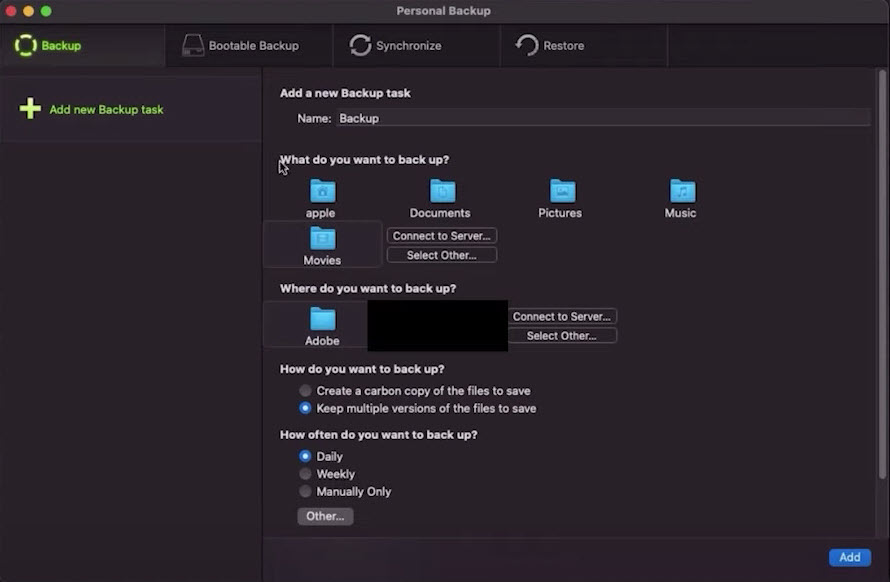
Restoring files is just as easy as backing them up. Whether you want a simple, one-click recovery or need more control over how and when your backups run, Personal Backup gives you the flexibility to do it your way. It’s hard to fault the backup tool, but in the same light, we cannot recommend it over Apple’s Time Machine, which comes built-in and covers all of the necessary functionalities.
ContentBarrier
Parental control apps are useful if you’re a young parent struggling to set boundaries for your children’s PC time. The app allows you to create customizable profiles for multiple children based on their age and even browsing habits. You can block inappropriate websites, track chats for predators, and even restrict access to certain apps. If you want to extend the oversight, you can expand the protection to include a log of visited websites, a log of chat conversations, and even keystroke recording. If it detects potentially unsafe messages, it can send email alerts, helping parents step in when necessary. The software also allows parents to control which apps can access the internet, block spam and illicit content, and even restrict game violence or file sharing. For those who prefer a more hands-off approach, there’s a “watch mode” that logs activity without blocking anything, providing insight without disrupting daily browsing. While some options may seem a bit excessive, the dangers of the internet and predators lurking for children online can help justify most of the options on offer.
Privacy Protection VPN
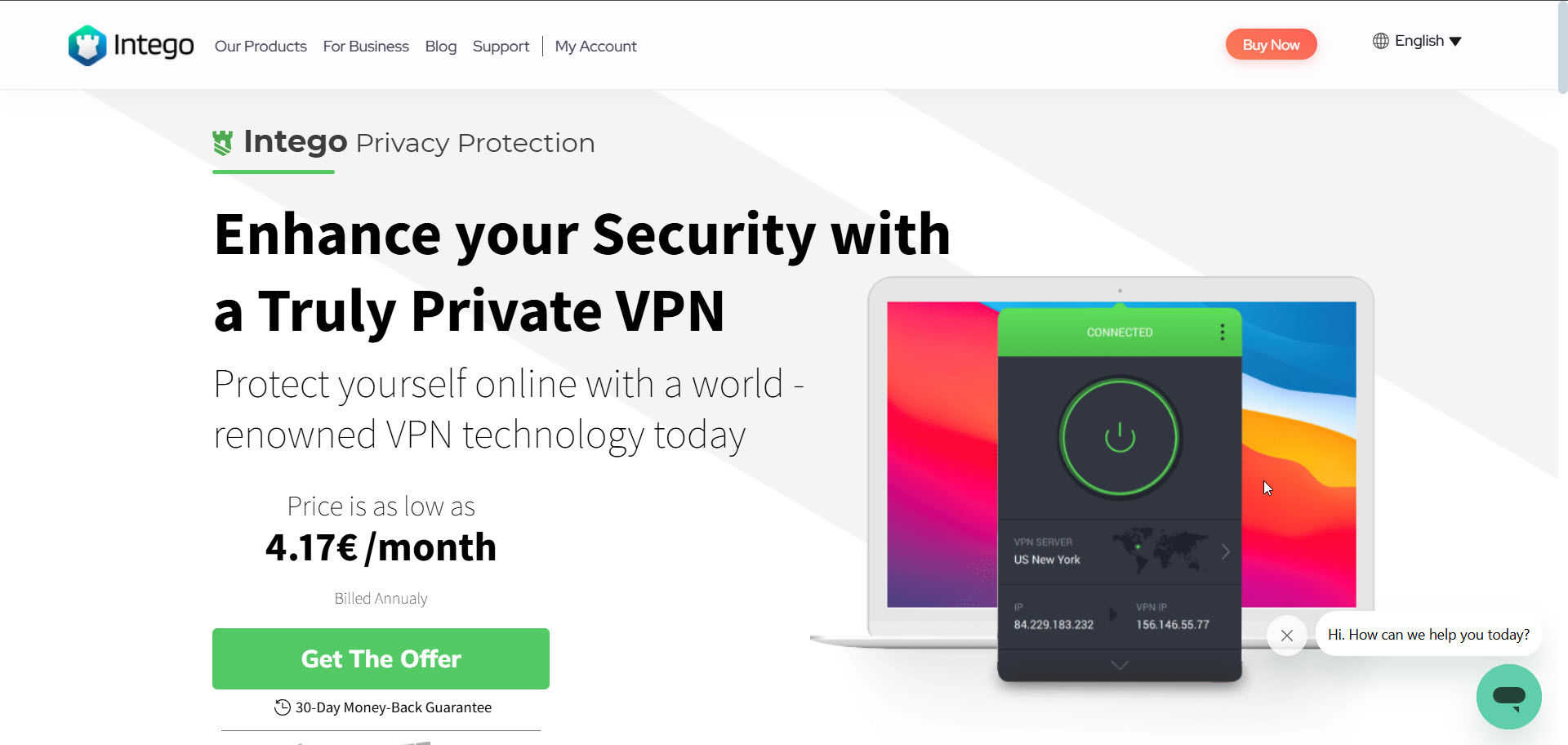
Intego’s VPN starts by offering over 35,000 servers spread out across 83 countries. In the US, you can rely on blazing fast speeds, which partially extend to other countries on the list (of course, depending on which country). Also, before we forget, you can purchase the VPN service completely separately, starting at €4.17 a month, but as mentioned under plans and pricing, it comes under the “Mac premium bundle + VPN” plan.
With support for AES-128 and AES-256 encryption, users can choose their preferred level of security. It also offers multiple protocols, including OpenVPN (UDP and TCP) and WireGuard, ensuring both speed and reliability. One of its standout security features is the Kill Switch, which comes in three variations: a standard VPN Kill Switch, an Advanced Kill Switch, and Intego Privacy Protection MACE, all designed to prevent data leaks if the VPN connection drops. A unique VPN Snooze function lets users temporarily pause the VPN without fully disconnecting, making it a flexible option for those who want a seamless balance between security and convenience.
As VPNs go, it’s not the best option out there, but it does cover all of the functionalities that both intermediate and advanced users may want. If you’re getting the bundle, then the VPN is a great added value, but purchasing the VPN by itself would require pitting it against the heavyweights in the field. Overall, it will depend on your needs and the budget you have set for security features.
Security and privacy
While many competitors focus on cross-platform versatility, Intego maintains a “Mac-first” security posture. In testing, I found that VirusBarrier does the heavy lifting, catching not just Mac bugs but Windows ones too, which is great if you’re the designated ‘tech support’ for your family’s PC network. Further, this helps prevent your Mac from spreading malware to other devices on your network. VirusBarrier also supports scheduled scans, so you can run full system sweeps during off-hours without disrupting your workflow. Scan results are detailed enough to be useful without overwhelming non-technical users.
NetBarrier X9 is a standout for privacy. Unlike macOS’s built-in firewall, which handles incoming connections, NetBarrier controls outgoing data. It’s satisfying to see exactly which apps are trying to ‘phone home’ and having the power to shut them up with a click. You can set rules for each network type, so your Mac behaves differently on a trusted home connection than on public Wi-Fi. This kind of granular control is genuinely rare at this price point.
The higher-tier “Complete” plan adds Intego Privacy Protection, a VPN that uses the Lightway protocol to mask IP addresses and secure connections over public networks. It’s a straightforward privacy tool that sidesteps the data-selling risks associated with free VPNs, though it lacks the multi-hop routing and advanced obfuscation found in standalone VPN services.
Beyond core security, you’re getting local and network backups with versioning support, which complements Time Machine rather than replaces it. Washing Machine X9 tackles duplicate files, large attachments, and app clutter. These aren’t security tools, but they add practical value for users who want system maintenance and protection in a single subscription. The tradeoff is that Intego still doesn’t include a password manager, a gap that competing suites have moved to fill.
The competition
Intego isn’t the only player in town anymore, and its rivals are packing some serious heat. Norton 360 for Mac is Intego’s closest competitor in terms of brand recognition and overall feature depth. Norton offers a more unified interface and bundles a password manager and cloud backup, both of which Intego omits entirely. For users who want a single subscription to cover those bases, Norton has a clear edge. That said, Intego tends to be less intrusive on system resources, and its Mac-specific focus means fewer features that exist primarily to pad a Windows feature sheet.
Bitdefender Antivirus for Mac is the most commonly recommended option for users who want reliable protection with minimal ongoing involvement. It scores competitively in independent malware removal tests, maintains a smaller performance footprint, and typically carries a lower renewal price than Intego. The catch? Bitdefender is a bit of a ‘set it and forget it’ tool. If you want to see every outbound data packet (as NetBarrier allows), you’ll find Bitdefender too hands-off.
Surfshark One has emerged as a compelling option for privacy-first Mac users. It bundles a capable VPN with antivirus tools at an aggressive price, and the VPN component is arguably stronger than Intego’s Lightway-based offering. However, Surfshark’s firewall controls don’t match NetBarrier’s depth, and its antivirus roots are shallower than Intego’s decades of Mac-specific development.
MacKeeper used to be the black sheep of Mac software. While it’s cleaned up its act and earned Apple’s nod, it still feels more like a cleanup crew than the specialized security fortress Intego offers. It primarily appeals to users seeking both security scanning and system cleanup in one place. Performance optimization is genuinely central to the MacKeeper experience, and it feels more integrated than Intego’s Washing Machine add-on, though Intego’s core antivirus protection remains more battle-tested.
Final verdict
Intego represents a good choice for users looking to add an additional layer of security on top of the built-in features Apple offers with its OS. The fact that you can get a bundle of 5-in-1 tools could represent a great offer if you’re actually going to use all of the tools. The antivirus tool updates fairly regularly, is easy to use, and is powerful enough to offer you peace of mind. The same can be said for the firewall tool and the Washing Machine.
Backup and parental control tools are a harder sell, especially if you don’t have children; then, parental control makes no sense for you. And thanks to Apple’s great built-in tools, the backup tool simply seems like an additional hassle.
So finally, the usefulness of the offer will depend on your actual needs. If the bundle seems overkill, you can always go for the 2-in-1 solution and evaluate the VPN offer separately. The features are well-designed, perform reliably, and make this a solid option worth considering.
“}]]
 A fully loaded Mac security solution with some useful extras Read More Latest from TechRadar US in Reviews