
[[{“value”:”
Individual cybersecurity could previously be glossed over, but the situation has changed. Cyber threats have become more sophisticated, as malicious actors increasingly deploy artificial intelligence (AI) tools. From AI-generated phishing emails to deepfakes and automated vulnerability scanning, individuals need protection against the widening net of cyberattacks.
The good thing is that AI also aids in fighting cyberattacks. Cybersecurity tools have become much more sophisticated at countering sneaky methods. To make online protection more accessible, platforms offer all-in-one cybersecurity suites with many features.
IDX is one example, and I’m reviewing it to see how it stacks up alongside the best data removal services and identity theft protection tools we’ve tested. Read on to learn about the features you’ll get with an IDX Complete subscription, its pros & cons, and how it fares against competitors.
IDX Complete: Plans and pricing
You can see the full list of services from IDX by clicking here.
IDX offers various pricing plans, but in this review I’m focusing on the Complete bundle. For $33 monthly, this bundle offers a data removal service, password manager, VPN, dark web monitoring, identity theft insurance, and many other features.
It’s a steal compared to paying for each feature separately. Think of having to pay separately for a VPN, password manager, and data removal platform– it can run into $100 a month, compared to a $33-per-month IDX Complete plan.
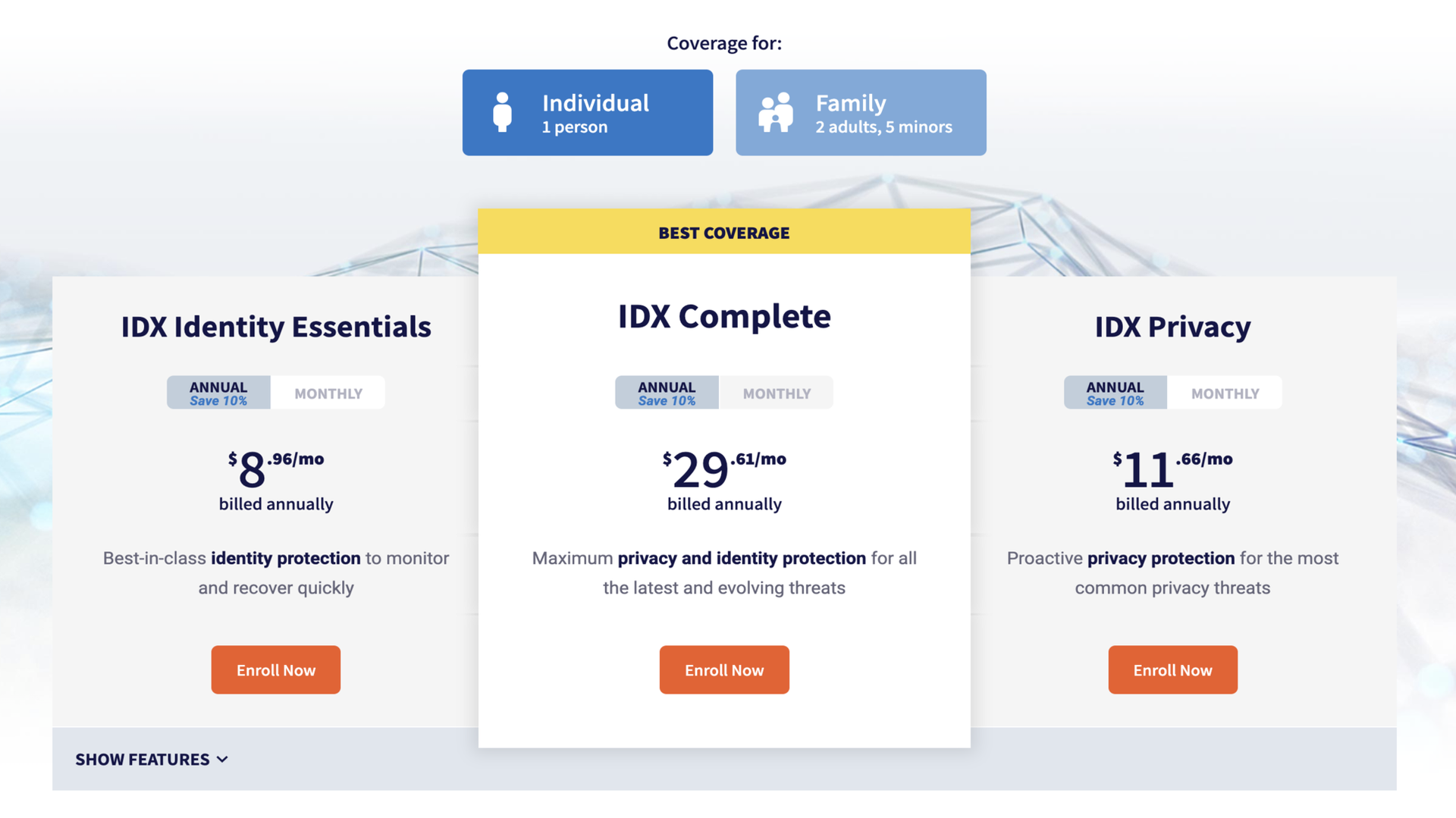
Users who pay annually get a 10% discount compared to paying month-to-month. I’m unimpressed with this discount, as 30% to 50% is the norm for most cybersecurity bundles I’ve reviewed. If I decide to pay for 12 months upfront, I think I deserve more than 10% off, but some platforms disagree.
IDX also offers a family version of the Complete plan. For $65 per month, the same features on the individual plan are expanded to 2 adults and 5 dependents under 18. It’s built for a conventional family of two parents and several children.
I’ve reviewed many family cybersecurity bundles and hardly encountered age specifications for users. It’s usually just a limit (e.g., 5 or 10 members) regardless of age, but IDX Complete is the exception.
IDX doesn’t offer a standard free trial or money-back guarantee. This is another complaint I have about its pricing system.
IDX Complete: Setup
Setting up IDX follows a straightforward pattern. It starts by entering your name and email, then choosing a password. However, there’s an obstacle here. I mentioned that IDX doesn’t offer a free trial—users have to choose a plan and enter payment details before gaining access. It’s a strictly paywalled service, unlike several platforms I’ve tested that offered free trials at the get-go, then requested a payment later.
After subscribing to the IDX Complete bundle and gaining access, it’s time to start using its security features. IDX offers many features under this bundle, so much that I’ll struggle to cover every one in this review. Instead, I’ll focus on the core features that keep users safe online.
The first is the ForgetMe data removal service. With this feature, you can scan data broker sites for your personal information. If your information is found on any site, IDX sends automated deletion requests. An IDX scan covers 100+ data broker sites, which isn’t as extensive as designated data removal platforms (many rivals cover 500+ sites), but it’s sufficient to remove your information from the most popular data broker sites.
The second is the password manager. This tool lets you store passwords securely and, if needed, share them with others. When it’s time to log into any site with a saved password, you’ll simply autofill the details. This tool also checks if your password got compromised in data breach incidents and alerts you immediately– the corrective action is to change the password for every site where you’ve used it.
The third is the virtual private network (VPN) feature. A VPN encrypts your online traffic by routing it through remote servers—think of surfing the web in the U.K., but using an IP address from faraway Australia. Your identity gets disguised to third parties that want to show you personalized ads or maybe stage malicious attacks.
A VPN is particularly important when you use public WiFi networks, which are often insecure. When using the IDX VPN, I could choose from roughly 20 server locations. This figure pales compared to dedicated VPN apps, some of which offer 200+ locations from countries down to cities. IDX’s server coverage is nowhere near as widespread, but the VPN worked reliably.
For U.S.-based users, IDX Complete includes identity theft recovery and insurance. That is, if a user experiences identity theft, IDX experts walk them through the corrective actions (e.g., freezing credit files and closing certain accounts). Users can get reimbursed for damages if they pay for an insurance plan.
Admittedly, I didn’t get to test the identity theft recovery feature (and hopefully won’t need it soon), but it’s a valuable service when needed.
From my perspective, IDX Complete doesn’t offer the best of each feature, relative to competitors, but the bundle is unbeatable. It’s not the best VPN compared to standalone VPN apps, nor the best data removal platform compared to rivals. However, offering many cybersecurity features in one cost-effective package is the selling point.
IDX Complete: Ease of use
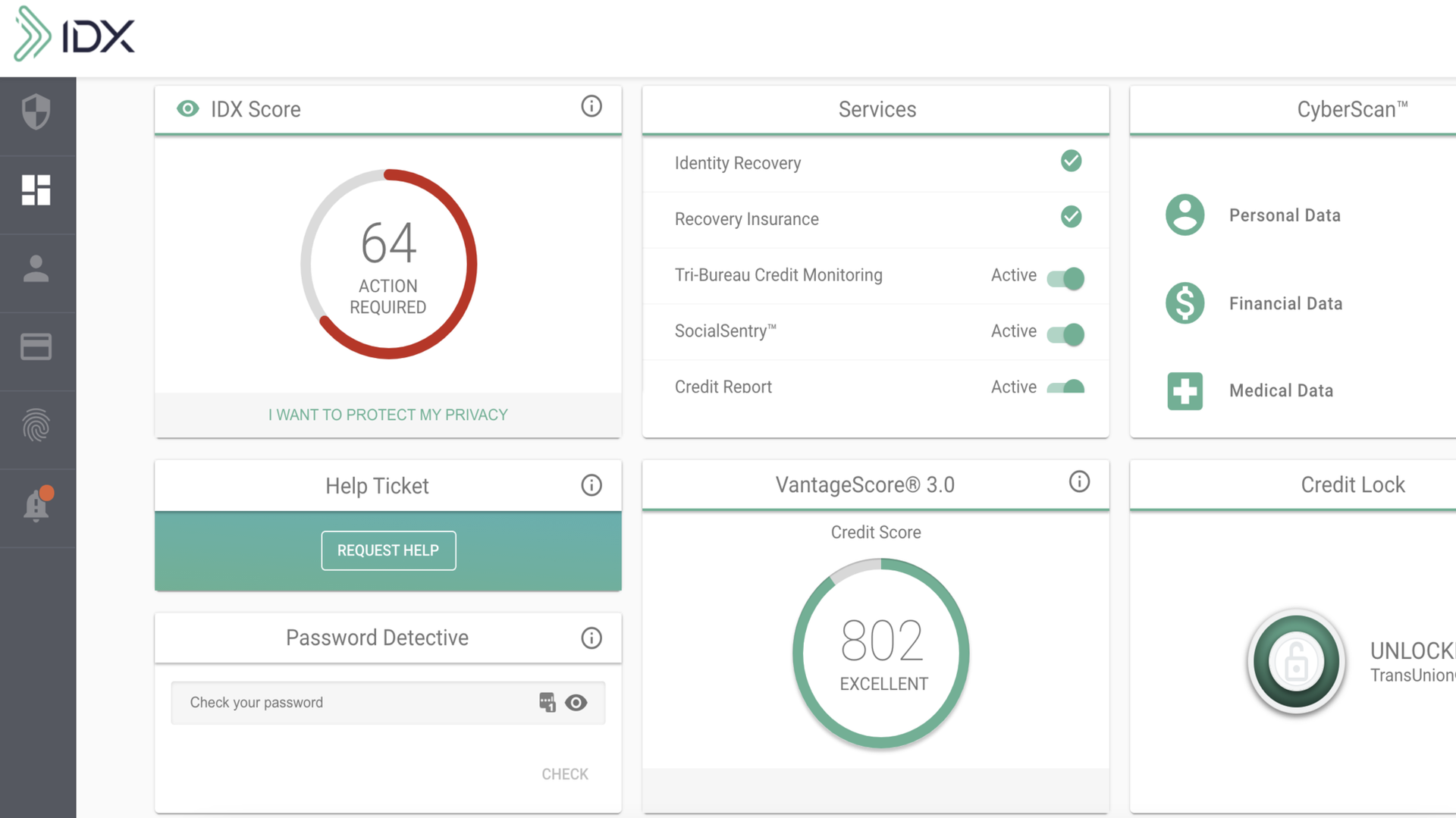
IDX offers a modern interface that I liked using. It’s best described as minimal and simple. It’s not too interactive like I’ve found on some apps, yet not too bland. I’ll say it prioritized function over form, with features neatly arranged in places users can easily find them.
You can access IDX from a web browser or download the mobile app (iOS and Android). I’ve tested various cybersecurity tools that didn’t have mobile apps, so I’ll note that having both iOS and Android apps is a benefit.
IDX Complete: Security and privacy
Given its numerous features, IDX Complete is a highly effective privacy protection tool. With it, you get to kill multiple cybersecurity-related birds with one stone. Better still, you get the numerous features at a lower cost in one bundle compared to paying for each one separately.
IDX Complete: Support
IDX users get decent support resources, starting with a Knowledge Center offering detailed user guides, how-tos, and articles discussing emerging cyber threats to watch out for. There’s also an FAQs section that provides solutions to frequently encountered issues. For direct support, users can contact IDX’s staff by filling out an online ticket, and a response is delivered via email.
IDX Complete: Competition
Competition is the name of the game in the cybersecurity niche, with countless platforms offering all-in-one bundles similar to IDX Complete. The PrivacyHawk bundle is the most notable rival I’ll mention. It offers similar personal protection features at an affordable price: $30 per month for the most advanced plan, which includes identity theft protection, dark web monitoring, data removal, and spam filtering.
Personally, I prefer PrivacyHawk because it offers some free scans to help users test its features, unlike IDX, which requires payment before granting access. PrivacyHawk also has a 30-day money-back guarantee, which IDX doesn’t offer.
IDX Complete: Final verdict
IDX Complete provides much value for money. For a monthly subscription, you’ll unlock various tools to protect your online privacy, getting a good deal compared to paying for each tool independently. However, I think IDX should offer a standard free trial to attract users. Being hard-paywalled puts it at a competitive disadvantage.
“}]]
 A detailed review of the IDX complete package, covering its features, setup, customer support, pros, and cons. Read More Latest from TechRadar US in Reviews